

Chatbots for Lead Generation: Qualify Inquiries Without Losing Context
The best chatbot for lead generation is the one that answers the visitor's question first, asks only the few qualifying questions your sales team actually uses, and hands an interested buyer to a manager together with everything already said: the need, the page they came from, timing and contact details. Its job isn't to collect as many emails as possible; it's to make sure a real inquiry reaches the right person quickly and never has to be repeated.
This guide covers what a lead-generation chatbot should do, example questions by business type, criteria for a qualified lead, and how to design the handoff. It doesn't promise conversion uplifts: without your own baseline and a clear method, nobody can.
What a lead-generation chatbot actually does
"Lead gen bot" covers four jobs. Decide which ones you need.
Job | What happens | Good for | Risk |
|---|---|---|---|
Capture | Collects name and contact details | Out-of-hours inquiries | Asking for contacts before helping annoys visitors |
Answer | Answers pre-sales questions from your materials | Product fit, pricing tiers, delivery, availability | Wrong answers about price or terms |
Qualify | Asks a few questions to understand need, fit and timing | B2B, services, custom orders | Too many questions feel like an interrogation |
Route and book | Sends the inquiry to the right person or department, or offers a call slot | Teams with several sales roles or regions | Promising a callback nobody makes |
Most businesses need answer + qualify + route. Capture alone is just a slower contact form.
The debate: AI sales bots in 2025–2026
AI "sales development reps" that write outbound emails and qualify leads on their own were one of the most hyped categories of 2024–2025, and the backlash followed. In March 2025, TechCrunch reported that a well-funded AI SDR startup had shown logos of companies that said they weren't customers, with sources describing high churn and a product that needed heavy manual correction; the company disputed parts of the report.
The lesson for inbound chat is useful: automation works best where the buyer has already shown intent (they came to your site and started typing) and where the bot's role is narrow: answer accurately, understand the request, pass it on. Fully autonomous "close the deal" bots are still a risky bet, and vendor claims about them deserve a trial with your own data.
Answer first, then qualify
The single biggest design mistake is gating answers behind a form: "Please enter your email to continue." Visitors who wanted a quick price range leave.
A better sequence:
Answer the question. "Our team plans start at $X per user; the exact quote depends on the number of locations."
Ask one natural follow-up. "How many locations do you have?"
Offer the next step. "I can pass this to a specialist who'll send a quote today. What's the best email?"
Confirm and set expectations. "Done. Maria from sales usually replies within two working hours."
Each question should earn its place: either the visitor gets a better answer because of it, or your sales team can't work the lead without it.
Qualifying questions that work
Keep it to three to five questions, asked one at a time, in the visitor's language. Examples by business type:
B2B software or services
"What are you hoping to solve, in a sentence?"
"Roughly how many people would use it?"
"Are you replacing a current tool, or is this new?"
"When do you want to have something running?"
"Should I connect you with a specialist for a quote or a demo?"
Home services and local businesses
"What do you need done, and roughly how big is the job?"
"What's the address or area?"
"When would you like it done?"
"Do you prefer a call or a message back?"
Wholesale and custom orders
"Which product, and what quantity?"
"Do you need custom branding or packaging?"
"What's your deadline for delivery?"
"Is this a one-time order or regular supply?"
Agencies and consultancies
"What's the project, and what's the main goal?"
"Do you have a budget range in mind?"
"Who else is involved in the decision?"
"When would you like to start?"
Avoid asking for things you can see yourself: the page they're on, their country (approximately), or details your site already knows about a signed-in customer.
What makes a lead "qualified"
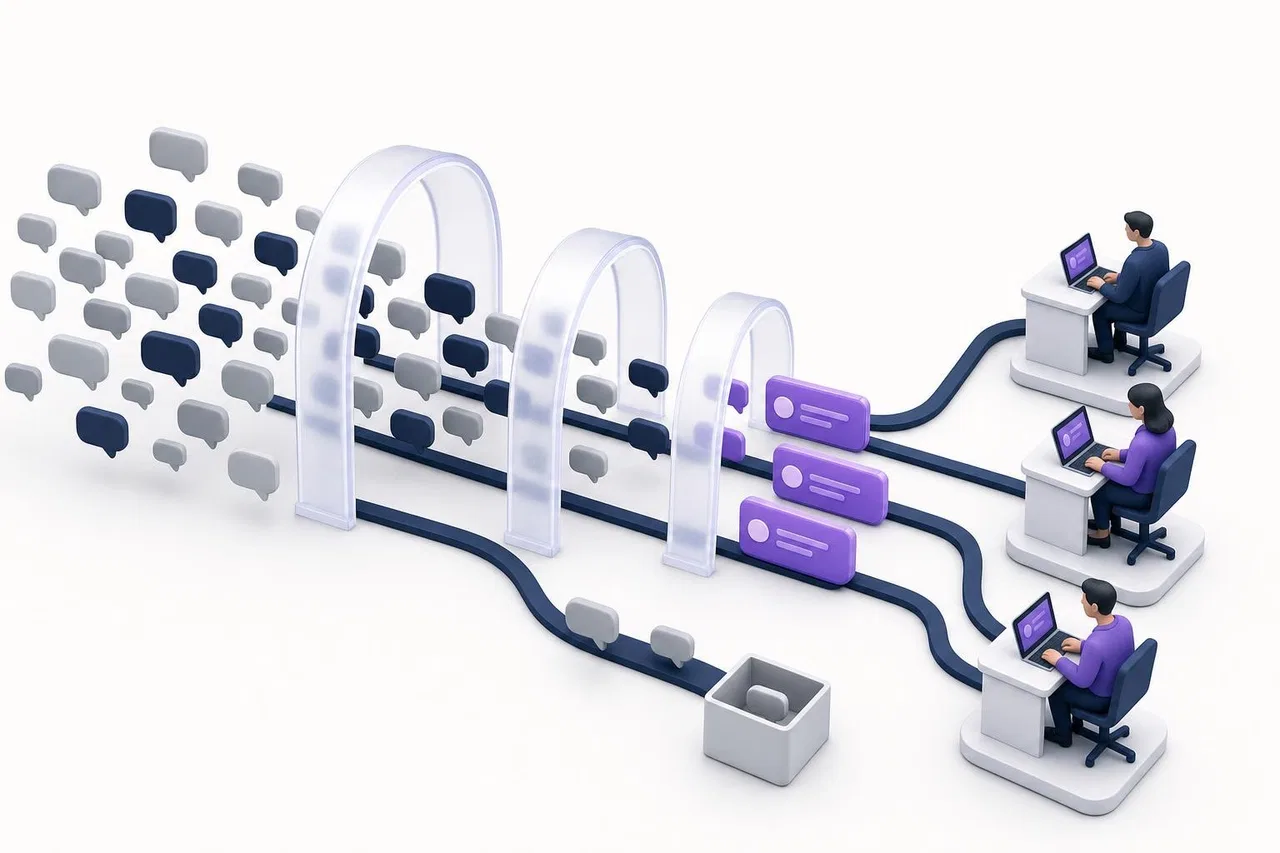
Agree on the criteria with sales before you build anything. A simple, practical definition:
Status | Criteria | What happens |
|---|---|---|
Sales-ready | Clear need that matches what you sell, a timeframe within your sales cycle, contact details, consent to be contacted | Route to the right rep or department immediately |
Warm | Real need but unclear timing or size | Route to sales with lower priority, or schedule a follow-up |
Nurture | Early research, no near-term need | Send useful material; no sales call |
Not a lead | Existing customer support issue, job seeker, vendor pitch, spam | Route to support, HR, or close |
Two points matter more than any scoring model:
Existing customers aren't leads. A support question disguised as a "Contact sales" chat should go to support, fast.
Consent and data minimization. Ask only for contact details you'll use, say what you'll do with them, and don't ask for sensitive data in chat. Data-protection rules such as the GDPR apply to chat as much as to forms.
The handoff: keep the context
A qualified lead that arrives in a rep's inbox as "New chat from Visitor 4821" is a lead half-lost. The handoff should carry:
The summary of the need in the visitor's words.
Answers to the qualifying questions.
The conversation history, so the rep doesn't ask again.
The page and path: which product or pricing page they wrote from, and what they viewed after.
Contact details and preferred channel.
What the bot promised: "a quote today," "a call tomorrow morning."

Then route it:
By department or region. Sales vs. support, or a regional team.
To someone available. Round-robin or least-busy routing so leads don't wait for one person.
With a reply deadline. If the assigned rep doesn't answer in a set time, the lead goes back to the queue.
Into your CRM. The deal, contact and next activity should be created while the context is fresh. See sales CRM and lead management for that side of the process.
Out-of-hours and follow-up
Be honest about time. "Our team is offline; you'll hear from us by 10 a.m. tomorrow" beats a fake instant promise.
Collect what's needed to follow up, and nothing more.
Follow up in the same channel. If the inquiry came via WhatsApp, reply there. Note that WhatsApp only allows free-form business messages within 24 hours of the customer's last message; after that you need an approved template, and Meta bills messages per message under its Business Platform pricing.
Remind once, not five times. A single "Did you still want that quote?" after a day of silence is helpful; a sequence of nudges isn't.
How to measure without fooling yourself
Avoid "chatbots increase conversion by X%" claims, including your own, unless you measure properly:
Record a baseline for a few weeks before launch: inquiries per week, share that become meetings or quotes, time to first human reply.
Define the lead stages (sales-ready, warm, nurture, not a lead) and tag every chat.
Track the funnel: chats started, questions answered, leads qualified, meetings or quotes, deals.
Compare like with like: the same pages and seasons, or an A/B split of visitors where your tools allow it.
Check quality, not just volume: what share of "sales-ready" leads did sales accept?
Checklist: choosing the best chatbot for lead generation
Answers pre-sales questions accurately from your own materials, and admits when it doesn't know.
Lets you ask a few qualifying questions without forcing a form first.
Shows the team the conversation, the page history and any data your site passes about the visitor.
Routes by department, with fair distribution and reply deadlines.
Works in the channels your buyers use: website, WhatsApp, Instagram, Telegram.
Can open proactively on high-intent pages (pricing, product comparison) without annoying everyone else.
Sends conversion events to your analytics, so you can measure the funnel.
Gets the lead into your CRM with little retyping.
Has transparent pricing at your volume.
How Sensever helps
Sensever handles the inbound side well and leaves qualification decisions to your people. Here is what exists today, from the customer support guide, the widget developer guide and the AI website chat guide.
Answers first. The project's AI assistant answers pre-sales questions from your articles, documents and tables, for example totaling a price list with a volume discount, and says when it has nothing to answer from.
Departments the visitor can choose. Create "Sales" and "Support" in "Project departments"; an active department can be shown to the visitor before the conversation starts, and its requests and notifications go to its staff.
Routing with deadlines. Least-busy or round-robin assignment; by default, if the assigned person doesn't reply within 5 minutes, the request can go to another eligible colleague. Both values are adjustable.
Context for the rep. "Visitor and page history" shows the page of the first message and later navigation on your site. If your site calls
SenseverWidget.identify(), the team sees a "From the site" block with the visitor's name, email and your own fields, marked as unverified unless your server signs them.Proactive messages on the right pages. Auto-messages with triggers such as "Visitor on the site" (by page, time and visitor rules), "Event on the site," "Visitor came back" and "Customer hasn't replied."
Measurement. The widget sends events such as
sensever_widget_message_sentto Google Tag Manager, so you can count chats as conversions in GA4 (GTM guide).Messaging channels. WhatsApp (Cloud API), Instagram Direct, Telegram and MAX land in the same "Requests," with WhatsApp templates for follow-ups outside the 24-hour window.
A CRM next door. Flow's CRM template creates companies, contacts, deals and activities with a deal pipeline (Flow overview).
Limits to know: the assistant doesn't run a configurable qualification script or lead scoring, and the documentation doesn't describe an automatic link that turns a request into a Flow deal. Today a rep creates the deal, or a developer connects the two through the API. Pricing: the owner answers for free, each additional team member who answers customers is $9 per month, AI is $19 per million tokens with a $5 minimum per project in months it's used, and Flow is $5 per month per additional member who edits (sensever.com).
FAQ
What is the best chatbot for lead generation?
The one that answers visitors accurately, asks only the questions your sales team needs, and hands the lead over with full context and fast routing. Test candidates on your own pre-sales questions rather than relying on rankings.
How many questions should a lead-gen chatbot ask?
Three to five, one at a time, after answering the visitor's own question. Every extra question should either improve the answer or be essential for sales.
Should the bot ask for an email right away?
No. Ask for contact details when there's a reason: the visitor wants a quote, a callback or a follow-up. Gating answers behind a form drives people away.
Can an AI sales bot replace sales reps?
For inbound inquiries it can answer, qualify and route. Negotiating, tailoring proposals and building trust are still people's work, and customers notice the difference.
How do I know if the chatbot improves lead generation?
Measure a baseline before launch, tag lead stages consistently, and compare meetings or quotes from similar traffic. Without that, any conversion claim is a guess.
Conclusion
A lead-generation chatbot earns its place by being useful first and brief second: answer, ask a few smart questions, and pass a complete picture to a person who replies quickly. Agree on what "qualified" means with sales, keep the handoff rich, and measure against a baseline before you believe any uplift. For related reading, see how to choose an AI chatbot for business, AI sales assistants and AI chatbots vs. live chat.

Comments