

What Is an AI Chatbot? How It Works and Where It Helps
An AI chatbot is a program that holds a conversation in plain language: it reads what a person types, works out what they mean, and writes a reply with a large language model instead of picking from a fixed menu of answers. A business chatbot of this kind usually answers from the company's own materials, such as help articles, price lists and policies, and hands the conversation to a person when it can't help. It is useful for repetitive questions at any hour; it is not a replacement for judgment, refunds or exceptions.

This guide explains, without heavy jargon, how an AI chatbot works, how it differs from the older scripted bots, where it helps a small or mid-size business, and what can go wrong.
Scripted bots vs. AI chatbots
Most people have met both kinds, often without knowing which one they were talking to.
A scripted bot (also called a rule-based or decision-tree bot) follows a flow someone drew in advance: "Choose 1 for orders, 2 for returns." It recognizes buttons and maybe a few keywords. When the visitor types something the designer didn't foresee, it loops back to the menu.
An AI chatbot (an AI powered chatbot, AI conversation bot or "intelligent chatbot" in marketing language) understands free text. "My parcel never showed up and I'm leaving town Friday" doesn't match any button, but a language model can tell it is a delivery question with a deadline. It can then look up the relevant policy and write an answer in the customer's own words and language.
Scripted bot | AI chatbot | |
|---|---|---|
Input it understands | Buttons, keywords, exact phrases | Free text in many languages, typos, follow-up questions |
Where answers come from | Texts written into each branch of the flow | A language model that writes a reply from instructions and retrieved sources |
Maintenance | Edit every branch when something changes | Update the source document; the next answer uses it |
Predictability | Very high: it says only what was written | Lower: wording varies, and it can be wrong |
Typical failure | "Sorry, I didn't understand" loops | A confident answer that isn't supported by your materials |
Good for | Fixed forms, menus, collecting a few fields | Open questions about products, policies, how-to steps |
Many real products mix both: buttons for the first choice, AI for free questions, and fixed messages for legal or safety texts that must never be paraphrased.
How an AI chatbot works, step by step
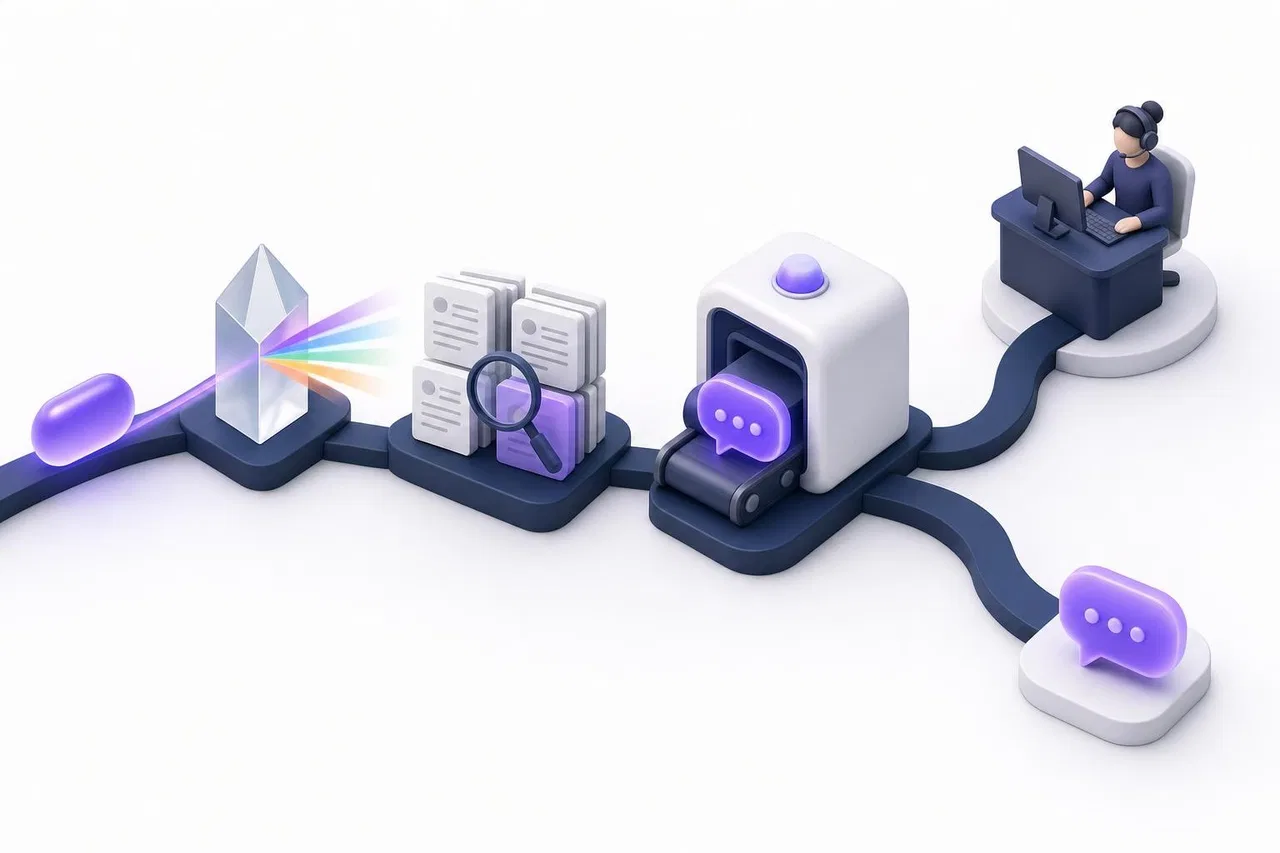
You don't need to know how neural networks are trained to use one well. You do need a picture of what happens between the customer's message and the reply, because every quality problem sits in one of these steps.
1. The message and the recent conversation
The bot receives the new message plus some of the conversation before it. That history is what makes "And how much is delivery to Denver?" understandable after a question about a specific sofa. Every product keeps only a limited amount of history, so very long conversations can lose early details.
2. Understanding the request
The model works out the intent: a greeting, a product question, an order status, a complaint, a request for a person. Some systems run a short, cheap classification step first and only fetch knowledge when the message is a real question.
3. Finding knowledge: retrieval
A general model knows a lot about the world and nothing reliable about your return window. So business chatbots use retrieval: before writing, the system searches your materials and passes the most relevant fragments to the model. This approach is often called retrieval-augmented generation, or RAG. Search usually combines matching words with matching meaning, so "send it back" finds a section titled "Returns."
Some chatbots can also read live data, such as an order's status from your shop system, through an API. That is what lets a bot answer "Where is my order 1042?" instead of describing the delivery policy in general.
4. Writing the reply
The model gets instructions (who it is, what tone to use, what it must not do), the conversation and the retrieved fragments, and writes a reply. Good systems tell the model to answer only from the sources and to say "I don't know" or offer a person when the sources don't cover the question.
5. Handing over to a person
The last step is the one buyers forget: what happens when the bot shouldn't answer. A useful AI chat passes the conversation to your team with the history intact, so the customer doesn't repeat themselves, and stops answering once a person takes over.
What "training" really means for a business chatbot
Vendors still say "train the bot on your data," which makes it sound like a months-long machine learning project. For most business chatbots it isn't. The model itself isn't retrained on your files. Instead, your documents are indexed so they can be searched, and the relevant parts are shown to the model at answer time.
This has practical consequences:
Updates are fast. Change the delivery article, and the next answer can use the new version.
Quality depends on your writing. If two documents contradict each other, the bot can quote either. Clear headings and one current version of each policy matter more than any setting.
Gaps stay gaps. If nobody wrote down the warranty terms for refurbished items, the bot has nothing to retrieve. A well-built bot should then say so rather than improvise.
Where an AI chatbot helps a business
The best uses share three traits: the question repeats, the answer exists in writing, and a wrong answer is cheap to correct.

Pre-sales questions on a website
"Do you ship to Canada?", "Does this model fit a 60 cm niche?", "Is there a student discount?" These come at night and on weekends, and a quick, sourced answer keeps the visitor on the page. A bot that can read a price list can also compare options or total an order.
Order and booking status
With a read-only connection to your system, the bot asks for an order or booking number and reports the status. This is one of the most frequent support questions in retail and services, and it rarely needs a person.
How-to and product help
Software companies, equipment sellers and service providers answer the same setup questions daily. A chatbot that quotes the right section of the manual, with a link, saves both sides time.
Messaging channels
Customers write on WhatsApp, Instagram and Telegram as often as on the website. An AI chatbot connected to a shared inbox can answer there too, while your team sees every conversation in one place.
Internal questions
The same technology answers employees: "What's our refund approval limit?", "Where is the onboarding checklist?" The difference is access: an internal bot must only reveal what that employee is allowed to see.
Limitations you should know before you start
Wrong answers that sound right
Language models can produce fluent text that is not supported by any source, usually called a hallucination. The best-known legal example is Moffatt v. Air Canada: in February 2024 a British Columbia tribunal held the airline responsible after its website chatbot described a bereavement-fare refund rule that didn't exist. The tribunal member wrote that "it should be obvious to Air Canada that it is responsible for all the information on its website," as Law360 Canada reported. The lesson for any business: what your bot says is what your company says.
Retrieval reduces this risk but doesn't remove it. Test with real questions, check the cited sources, and decide which topics (refunds, legal terms, medical or financial advice) go straight to a person.
Customers still want a human option
In a Gartner survey of 5,728 customers published in July 2024, 64% said they would prefer that companies didn't use AI for customer service, and the top concern was that it would become harder to reach a person. That doesn't mean "don't use AI"; it means the path to a human must be obvious and work every time.
Disclosure rules
In the European Union, the AI Act's transparency rules have applied since August 2, 2026. The European Commission's summary is direct: "Users must be clearly informed when they are not interacting with a real person." Even outside the EU, naming your bot as an assistant rather than giving it a human-sounding name is good practice.
Platform rules
Messaging platforms set their own terms. Since January 15, 2026, WhatsApp's Business Solution terms bar AI providers from distributing general-purpose assistants through the platform, while business bots that serve their own customers remain allowed, according to TechCrunch. A support bot for your shop is fine; an "ask me anything" bot on your number is not what the platform is for.
Privacy
Whatever a customer types goes to the model as part of the question. Find out which data a vendor sends to the model provider, whether your files leave its servers, and how long conversations are kept.
A quick checklist: is an AI chatbot right for you now?
You receive the same 20–30 questions every week, and the answers exist in writing (or can be written in a few days).
Customers write outside your working hours, or response time is a known complaint.
Someone on the team can own the knowledge: update documents and review conversations weekly.
You can name the topics the bot must never answer on its own.
Your team can pick up handed-over conversations within a reasonable time.
You know how you will pay: per seat, per conversation, per "resolution" or per token, and roughly what a month of your volume costs.
If you tick fewer than four, start by writing the knowledge base and improving live chat; the bot will be better for it later.
How Sensever helps
Sensever is a messenger with business tools, and its built-in AI assistant works inside the same customer requests your team already handles. Here is what it does today, based on the project assistant reference and the website AI chat guide.
Answers from your materials. You tick channels whose published articles become the assistant's knowledge and add files: PDF, DOCX, TXT, MD and HTML documents, and XLSX or CSV tables. Tables are queried like a small database, so the assistant can filter, sort and total rows ("the cheapest model in stock").
Live data, read only. Data connectors let the assistant call your own API, for example to look up an order status, without the model ever seeing your API key. Connectors only read data. Details are in the data connectors guide.
One inbox. The assistant answers in the website widget, the contact page and connected messengers: WhatsApp (Cloud API), Instagram Direct, Telegram and MAX. You can switch AI off for any single channel.
Test before customers see it. The "Test chat" shows the answer, the sources and table rows it used, whether the conversation would be handed over, and the tokens spent.
Handover without starting over. When the assistant finds nothing to answer from in your files or connectors, it tells the customer it is passing the question on, and the request goes to your team. When an agent takes the request or replies, the assistant pauses in it; the ⏸ / ▶ AI button brings it back. Routing rules are in Customer support: requests, team and routing.
Clear data boundaries. The model receives the instructions, the current message with the last four text messages, and the fragments found for the question. Customer contact details, visit history and your files themselves are not sent. Answers are written by an xAI (Grok) model; text extraction and meaning search for your documents run on Sensever's own servers.
What it doesn't do: there is no free-form "system prompt" field for the text assistant (you shape answers through your materials, the bot's name and one of three personalities), connectors can't change data in your systems, and scanned PDFs without a text layer can't be read yet.
Pricing, from the Sensever landing page: the project owner answers customers for free, each additional team member who answers customers costs $9 per month, and AI usage is $19 per million tokens, with a $5 minimum per project in each month the AI is switched on or used.
FAQ
Is ChatGPT an AI chatbot?
Yes. ChatGPT is a general-purpose AI chatbot. A business chatbot uses similar language models but is restricted to your materials and your tasks, and it hands customers over to your team.
Do I need to train an AI chatbot on my data?
Usually not in the machine learning sense. Most business chatbots search your documents at answer time and pass relevant fragments to the model, so keeping documents current matters more than "training."
Can an AI chatbot replace my support team?
Not fully. It can take routine, well-documented questions. Exceptions, complaints, refunds and anything requiring judgment still need people, and customers expect a quick way to reach them.
How accurate are AI chatbots?
Accuracy depends on the quality of your sources, the system's retrieval and its rules for saying "I don't know." Measure it yourself on 30–50 real questions before going live rather than relying on a vendor's average.
Are AI chatbots safe for customer data?
They can be, if you know what data goes to the model provider, who can see conversations and how long they are stored. Never let a bot read data the person asking isn't allowed to see.
What's the difference between an AI chatbot and an AI agent?
An agent is a chatbot that can also take actions: cancel a booking, issue a refund, update a record. Actions raise the stakes, so many businesses start with read-only bots and add actions later with approvals.
Conclusion
An AI chatbot is a language model wrapped in your knowledge, your rules and a reliable path to a person. It earns its place on repetitive, documented questions and in channels where customers write at all hours. Start with a narrow scope, write clear sources, test on real questions and keep the handover visible. For next steps, see how to build a custom AI chatbot, how to choose an AI chatbot for business and how to combine AI chatbots with live chat.

মন্তব্য