

WhatsApp AI Chatbots: Setup Questions, Use Cases, and Human Escalation
A WhatsApp AI chatbot is an assistant connected to your business number through the WhatsApp Business Platform that answers customers' messages from your own knowledge, such as policies, prices and order data, and hands the conversation to a person when it can't help. In 2026, business support bots like this are allowed. What Meta's terms bar are AI providers whose general-purpose assistant is the product itself. Before launch, settle three things: what the bot may answer, how and when it escalates to your team, and what it will cost under Meta's per-message pricing.

This guide covers the current rules, the use cases that work well, how to design human escalation, and a list of technical and organizational questions to answer before you switch the bot on.
What's allowed in 2026: Meta's AI policy
Meta changed the WhatsApp Business Solution terms in October 2025. As TechCrunch reported, the new terms took effect for all businesses on January 15, 2026 and bar "AI Providers", meaning developers of large language models and general-purpose AI assistants, from offering those assistants through the business platform when the AI is the primary functionality. Meta told TechCrunch the change "doesn't affect businesses that are using AI to serve customers on WhatsApp", such as a travel company's customer service bot.
The story didn't end there. According to Houthoff, Meta revised the policy in March 2026 to readmit rival AI assistants for a fee, and on June 9, 2026 the European Commission ordered interim measures requiring Meta to restore access for rival general-purpose assistants on the pre-October 2025 terms until a final decision. The current Meta Terms for WhatsApp Business Platform (last updated September 23, 2026) still contain an AI Providers clause, so check the current wording if your product is itself an AI assistant.
For a business that uses AI to support its own customers, the practical conclusion is simple: your support bot is fine. The restrictions target companies whose product is a general-purpose chatbot distributed over WhatsApp.
Meta also launched its own option. At its Conversations conference on June 3, 2026, Meta made Meta Business Agent available globally, an AI agent that answers questions, recommends products, books appointments and can hand off to a person (TechCrunch). On the platform, Meta prices Business Agent messages at $2.00 per million tokens, which Meta estimates at about 4 to 5 cents per message (Meta pricing updates). It's one more option to compare against a bot inside your own support tool.
What a WhatsApp AI chatbot costs
Two cost layers apply: Meta's messaging fees and your AI or platform fees.
Cost item | How it's charged (October 2026) | Source |
|---|---|---|
Service messages (free-form replies within 24 hours) | Free up to 1,000 per business phone number per month, then charged per message | Meta pricing updates |
Utility, marketing, authentication templates | Per delivered message, by category and country | Meta pricing |
Utility templates inside an open service window | Charged since October 1, 2026 | Meta pricing updates |
Meta Business Agent messages | $2.00 per million tokens | Meta pricing updates |
Your own AI model or platform | Set by your vendor: per token, per conversation or per seat | Your vendor |
A bot that answers many questions in one long thread now sends many service messages. On a busy number, that can exceed the monthly free tier. Count bot messages per resolved question during your pilot, not just conversations.
Use cases that work well
Good WhatsApp bots do a few narrow jobs reliably. The best candidates are questions that are frequent, have a clear answer in your materials, and don't need a judgment call.
Answering FAQs. Opening hours, delivery areas, return policy, product details, prices from a price list.
Clarifying the request. Asking for an order number, a city or a product model before a person takes over, so the agent starts with the facts.
Order and booking status. Reading live status from your system through an API, after checking that the customer is entitled to see it.
Lead qualification. Asking two or three questions (what, when, budget) and passing a summary to sales.
After-hours coverage. Answering simple questions at night and telling the customer when a person will reply to the rest.
Use cases that usually go wrong:
refunds, complaints and anything involving money decisions;
medical, legal or safety advice;
questions the knowledge base doesn't cover, where the bot is tempted to guess;
marketing pushes disguised as support replies.
Designing human escalation
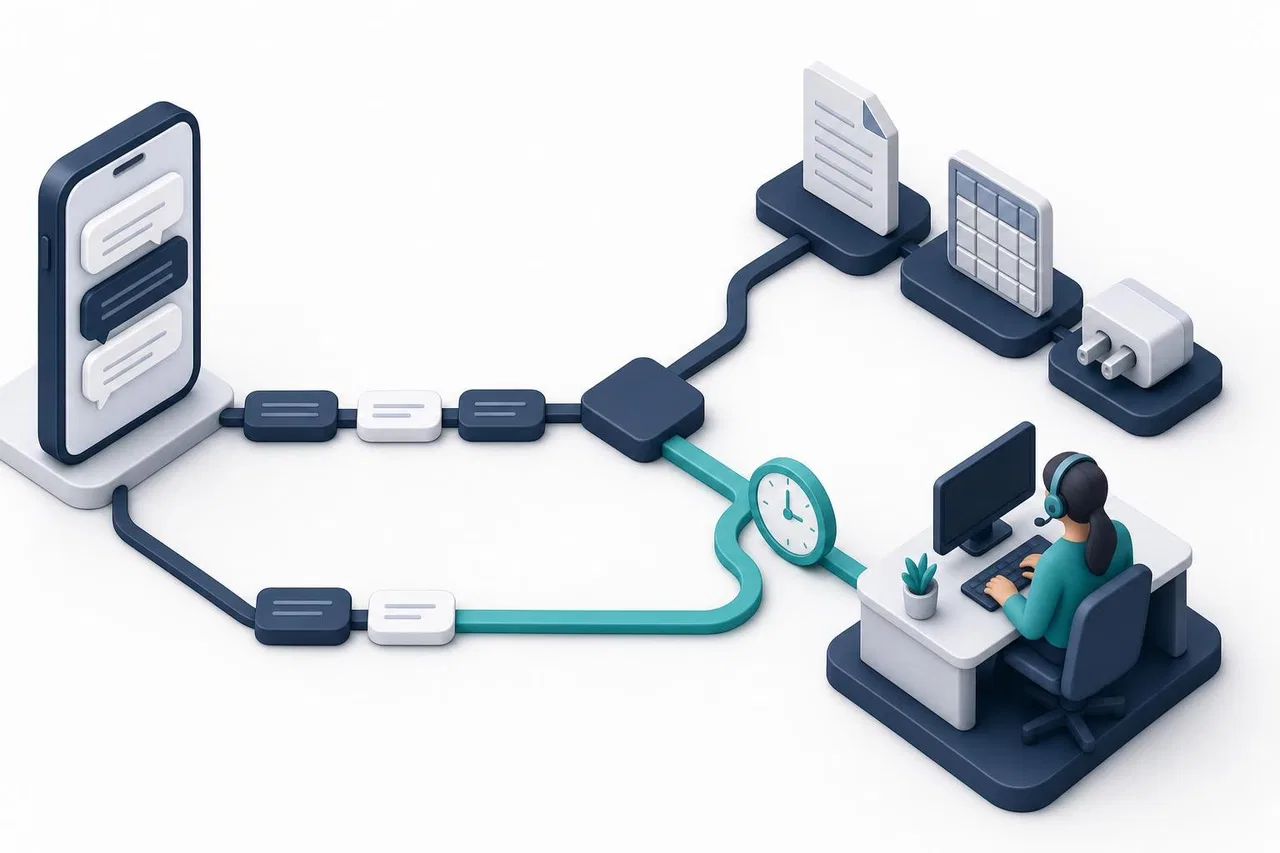
Escalation is the part customers judge you by. Gartner data reported by The Register in June 2025 found that 51% of customers trust human agents most for resolving issues, against 7% who trust AI most, and 62% worry AI will make it harder to reach a person. Design the handoff first, then the answers.
When the bot should hand over
The customer asks for a person, in any wording.
The bot has no source for the answer.
The message isn't text: a photo, a voice note or a document that needs a human look.
The topic is on your "always human" list: complaints, refunds, cancellations.
The customer repeats the same question, which signals the answer didn't help.
How the handoff should work
The bot tells the customer it's passing the question to the team, without promising an instant reply it can't guarantee.
The conversation goes to the queue as unanswered, with the full history.
When a person takes it, the bot stops answering in that conversation.
The person can see everything the bot said and the sources it used.
If the team wants the bot's help again later, they can turn it back on for that conversation.
Within the 24-hour window
Escalation takes time. If your team can't answer within 24 hours of the customer's last message, the reply will need an approved template. Agree on a response target well inside that window, and keep a "we're looking into it" template ready for the cases that slip.
Technical questions before launch
Number and connection. Is the number on the Cloud API through your own Meta app or a provider? Is your Meta business portfolio verified, so the number isn't stuck in test mode?
Coexistence. Do you need the WhatsApp Business app on the same number? Not every platform supports coexistence.
Knowledge sources. Where do answers come from: articles, PDFs, price tables, an API? Who updates them?
Live data. Which systems can the bot read, and how does it check the customer's identity before showing order data? The phone number shown in WhatsApp helps, but decide what it's allowed to unlock.
Message types. Will the bot handle voice notes and images, or send them to people?
Languages. Will it reply in the customer's language? Is your knowledge base available in those languages?
Templates. Which approved templates cover follow-ups outside 24 hours?
Data to the model. Which AI model is used, what is sent to it, and is customer contact data excluded?
Disclosure. Since August 2, 2026, the EU AI Act requires informing people when they interact with an AI system, a duty the Digital Omnibus left unchanged (Gibson Dunn, 2026). Make the bot's name and first message clear about it.
Logging and testing. Can you test answers before they reach customers, and see which sources each answer used?
Organizational questions before launch
Who owns the knowledge base, and how often is it reviewed?
Which topics are "always human"?
Who watches the queue for escalated conversations, and during which hours?
What response time after escalation do you commit to?
Who reviews a sample of bot conversations each week?
How will you measure success: share of questions resolved without a person, escalation rate, customer feedback, cost per resolved question?
Who can pause the bot if something goes wrong?
A simple testing plan
Collect 50 real questions from your WhatsApp history, including messy ones with typos and two questions in one message.
Run them through a test chat before going live. For each, check the answer, the source used, and whether the bot correctly decided to hand over.
Fix the knowledge, not the prompt. Most wrong answers come from missing or unclear material. Add a clear section with a precise heading.
Go live on one channel or during set hours first, for example after hours only.
Review daily for the first week, then weekly. Track escalations and any answer a person had to correct.
How Sensever runs an AI assistant in WhatsApp
In Sensever, the project's AI assistant answers customers inside Requests, the shared inbox, including requests from a connected WhatsApp number. The facts below come from the project assistant guide, the AI chat guide, the channel access guide and the WhatsApp connection guide.
Connection. WhatsApp connects through Meta's Cloud API with your own Meta app. You don't need a website: a project can have only messaging channels, and the assistant answers there.
Per-channel control. Every channel has its own "AI answers in this channel" switch, on by default. You can keep the assistant on your website and let people answer WhatsApp, or the other way around.
Knowledge. The assistant answers from knowledge base channels (articles you publish in Sensever), your files (PDF, DOCX, TXT, MD, HTML) and tables (XLSX, CSV), which it queries like a small database. Data connectors let it read live data, such as an order status, from your API; connectors only read data, and the model never sees your key.
Test chat. Before turning it on, you ask questions the way a customer would and see the answer, the sources used, the searches and connector calls, whether the conversation would be handed over, and the tokens used. Nothing is sent to customers.
Escalation. The assistant answers only from your materials. When the project has its own files or connectors and it finds nothing to answer from, it tells the customer it's passing the question to an operator, and the request goes to your team as unanswered. Customers can ask for a person directly. Messages without text, such as a photo on its own, go to the team.
Human takeover. When an agent takes the request or replies, the assistant pauses in it. The ⏸ / ▶ AI button in the request header turns it back on without leaving the chat. If the model fails, the customer gets a short notice and the request goes into normal routing.
What the model receives. Answers are written by an xAI (Grok) model. It gets the bot's instructions, the current message with the last four text messages of the request, and the fragments found for the question. The customer's contact details, visit history and other requests are not sent to the model.
Your own bot instead. If you prefer your own model and logic, choose "Your server": Sensever forwards customer messages to your bot's webhook and passes the replies back.
What to keep in mind: the assistant answers new text messages, so voice notes and images without text go to people. Replies still follow WhatsApp's 24-hour rule, and Meta bills its message fees directly. Sensever charges for AI usage at $19 per million tokens, per the landing page, and each additional team member who answers customers is $9 per month.

FAQ
Are AI chatbots banned on WhatsApp?
No. Since January 15, 2026, Meta's terms restrict AI providers from offering general-purpose assistants as the main product over the business platform, and regulators have challenged even that. Businesses using AI to support their own customers are not affected.
What is the best chatbot for WhatsApp?
The one that answers from your own knowledge, shows its sources in testing, hands over cleanly to people, and fits your inbox and budget. Compare a bot inside your support tool, Meta Business Agent and custom builds on the same 50 real questions.
How much does a WhatsApp AI chatbot cost?
You pay Meta for messages: service replies are free up to 1,000 per number per month, then charged, and templates are charged per message. On top of that comes the AI or platform fee, which varies by vendor.
Can a WhatsApp chatbot message customers first?
Only with an approved template, and the customer must have agreed to receive messages. Free-form messages are allowed only within 24 hours of the customer's last message.
How do I make sure customers can reach a person?
Hand over when the customer asks, when the bot has no source, and for sensitive topics. Make sure the bot stops once a person takes over, and that your team answers within the 24-hour window.
Does the same bot work on my website and Telegram?
It can, if your platform supports several channels, but check each channel's rules. See Telegram Chatbots for Customer Support, Customer Service Chatbots and How to Prepare a Knowledge Base for an AI Website Assistant.
Conclusion
A WhatsApp AI chatbot is worth it when it answers a narrow set of frequent questions from your own materials and hands everything else to people quickly. The 2026 rules allow business support bots, but Meta's per-message pricing and the 24-hour window shape both cost and escalation design. Settle the technical and organizational questions first, test with real questions before launch, and review the conversations every week. For connecting the bot's conversations to sales follow-up, see WhatsApp CRM Integration.

Commentaires